AI crawlers and robots.txt: what you need to know in 2026
Should you block AI crawlers in robots.txt? GPTBot, OAI-SearchBot, PerplexityBot explained — and why blocking makes you invisible to AI. Check free.
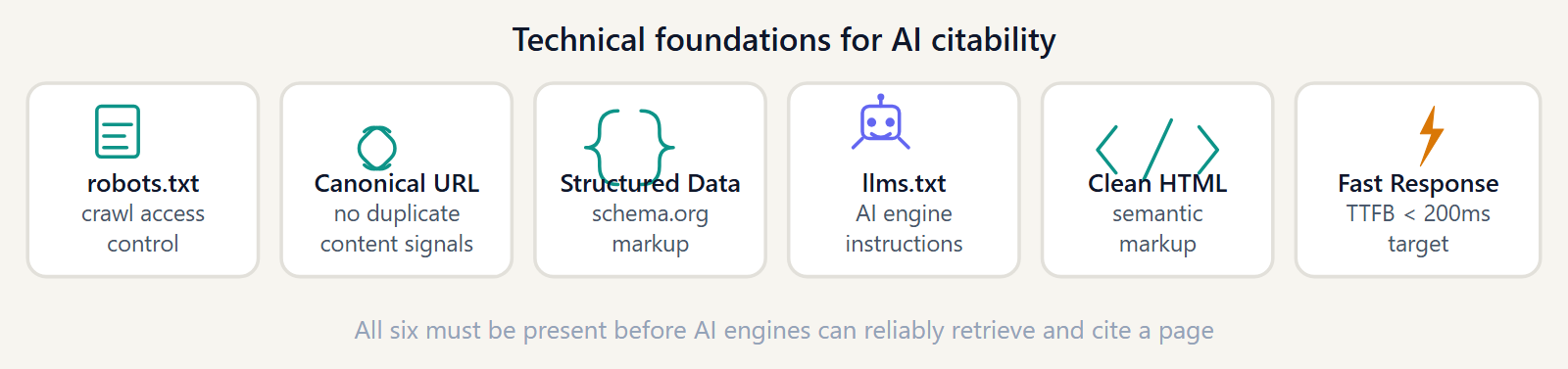
Your robots.txt file is a 30-line text file. It can make or break your AI search visibility. Get it wrong, and every AI answer engine — ChatGPT, Perplexity, Claude, Gemini — treats your site as if it does not exist. Get it right, and you open the door to citation across every major AI platform, at no cost.
Here is exactly what you need to know.
The two types of AI bots you need to know
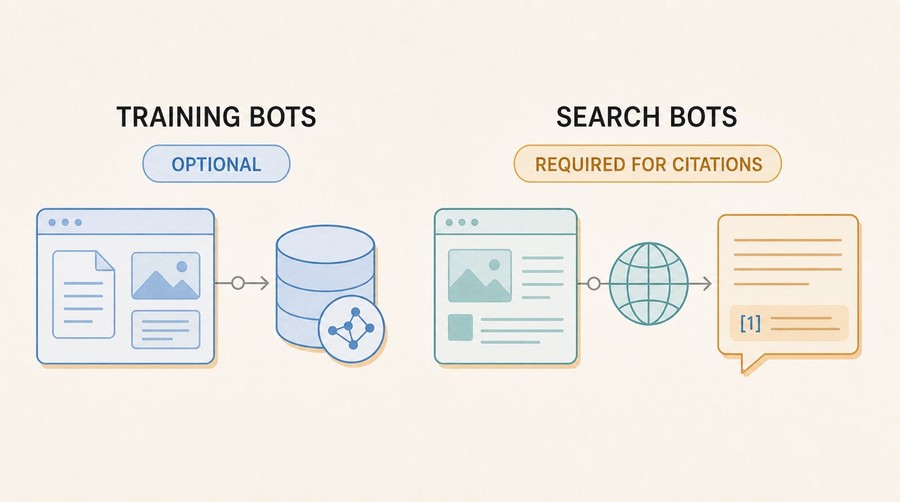
Not all AI crawlers work the same way. There are two fundamentally different categories, and confusing them is the most common mistake site owners make.
Training crawlers
These bots collect content to train AI language models. When they visit your site, your text may eventually become part of a model's training data.
- GPTBot — OpenAI's training crawler
- CCBot — Common Crawl, used widely across the AI industry
Blocking training crawlers is a legitimate choice. If you do not want your content used to train AI models, blocking GPTBot and CCBot is the right call. This decision does not directly affect whether ChatGPT or Perplexity cites you in real-time answers.
Search and retrieval crawlers
These bots index your content so that AI answer engines can cite it when users ask questions. They power the real-time web retrieval behind ChatGPT Search, Perplexity, Claude's web search, and Bing Copilot.
- OAI-SearchBot — used by ChatGPT when browsing the web
- PerplexityBot / Perplexity-User — powers Perplexity's live citations
- ClaudeBot / Claude-SearchBot — Anthropic's web retrieval bots
- Bingbot / Bingbot-News — Microsoft Bing, which also powers Copilot
- Google-Extended / Googlebot — Google Search and AI Overviews
- Applebot — Apple Intelligence and Safari suggestions
- AI2Bot — Allen Institute for AI
- xAI-Bot — Grok by xAI
Blocking any of these crawlers means your site will not appear in that platform's AI-generated answers. There is no workaround. If OAI-SearchBot cannot read your pages, you will not be cited in ChatGPT, regardless of how good your content is.
The robots.txt rules that affect AI visibility
A robots.txt file works through a simple matching system: specify a User-agent (which bot), then list Disallow rules (what it cannot access). A wildcard User-agent: * applies to all bots not otherwise specified.
The dangerous pattern — blocking everything
This configuration blocks all bots, including every AI crawler:
User-agent: *
Disallow: /
It is more common than you would expect — often a leftover from a staging environment, a misconfigured CMS, or a security hardening template applied without checking. The result: every AI crawler hits a wall on every page.
The correct pattern — explicit AI allowlist
The safest approach is to use the wildcard for generic restrictions, then explicitly allow AI search crawlers:
User-agent: *
Disallow: /api/
Disallow: /admin/
# AI search crawlers — explicitly allowed
User-agent: OAI-SearchBot
Allow: /
User-agent: PerplexityBot
Allow: /
User-agent: ClaudeBot
Allow: /
User-agent: Claude-SearchBot
Allow: /
User-agent: Bingbot
Allow: /
User-agent: Google-Extended
Allow: /
User-agent: Googlebot
Allow: /
User-agent: Applebot
Allow: /
User-agent: AI2Bot
Allow: /
User-agent: xAI-Bot
Allow: /
# Training crawlers — block if you prefer
User-agent: GPTBot
Disallow: /
User-agent: CCBot
Disallow: /
Sitemap: https://yourdomain.com/sitemap.xml
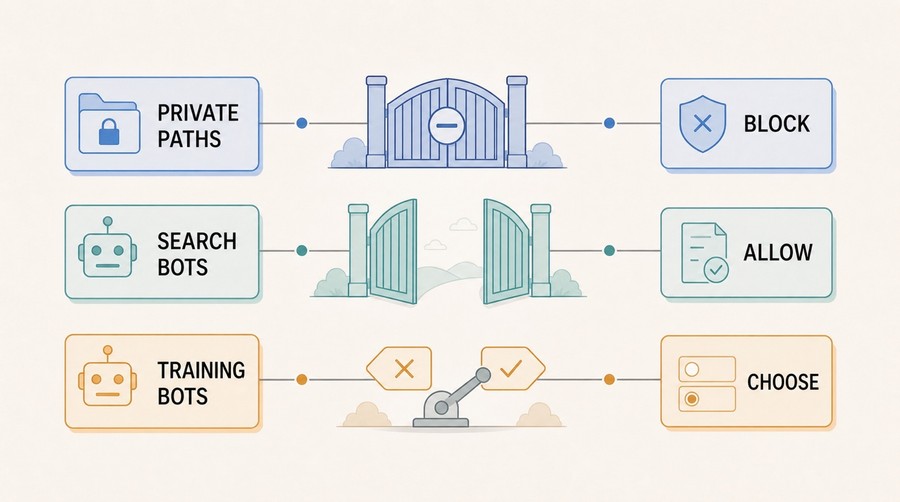
This configuration keeps private paths locked, allows all AI search crawlers, and gives you the option to block training crawlers. Adjust GPTBot and CCBot based on your training-data preference.
What GeoReady data shows
In our June 2026 State of GEO benchmark, crawler access is the single highest-weighted category in the GeoReady audit — 18 out of 100 points. It is also the most actionable: a misconfigured robots.txt can be fixed in under ten minutes, and the impact on your AI visibility score is immediate.
What the data reveals: a significant share of sites that score poorly on crawler access are not intentionally blocking AI bots. The block is a side effect of a wildcard Disallow rule that was never updated to account for AI search crawlers — bots that did not exist when the rule was written.
This means the fix is not a content problem or an authority problem. It is a configuration problem. And configuration problems have deterministic solutions.
How to audit your current robots.txt
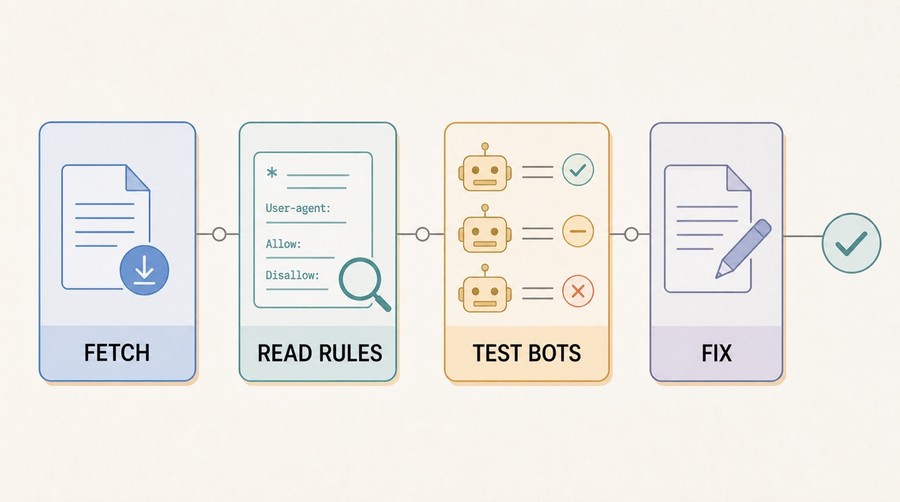
Start with the file itself:
curl https://yourdomain.com/robots.txt
Read every Disallow rule under User-agent: * (the wildcard). Ask yourself: does this rule also apply to OAI-SearchBot, PerplexityBot, and the other search crawlers listed above? If the answer is yes, you have a problem.
Look specifically for:
- Disallow: / — blocks everything for everyone
- Disallow: /* — same effect with a glob
- A missing robots.txt entirely (returns 404) — some servers default to "allow all", but not reliably)
- A robots.txt served behind authentication (returns 401 or 403 to crawlers)
Run a free GeoReady audit to check your crawler access automatically. The audit inspects your robots.txt, tests each AI crawler rule, and flags any configuration that would block a search bot — no manual parsing required.
The recommended robots.txt for AI visibility
A production-ready robots.txt for a site that wants maximum AI search visibility looks like the template above. A few implementation notes:
- Do not use Crawl-delay for AI bots. It slows them down but does not improve citation probability. On high-traffic sites with server constraints, a crawl delay for Googlebot is reasonable; for AI search bots, the default crawl rate is already conservative.
- Keep Disallow rules specific. Blocking /api/ and /admin/ is good practice. Blocking /wp-admin/ or /login/ is fine. Avoid broad patterns like Disallow: /*?* (query strings) unless you have specific duplicate-content reasons — it can block legitimate indexing paths.
- Include your Sitemap: directive at the end of the file. Every major crawler reads it, and it helps them discover pages efficiently without relying solely on crawl budget.
- Serve robots.txt as text/plain with a 200 status. A 404, 500, or redirect on /robots.txt is treated by most crawlers as "block everything" by default.
For the next layer of AI discoverability beyond robots.txt, see what llms.txt is and how to implement it — the complementary signal that tells AI models what your site is about, not just whether they can access it.
Common mistakes
These are the configurations that consistently cost sites their AI search visibility:
Blocking everything with a wildcard, no AI bot exceptions
User-agent: * / Disallow: / is the most common single mistake. It was a reasonable staging-environment pattern in 2018. Today it silences your site across every AI platform simultaneously.
Blocking GPTBot thinking it stops all AI access
GPTBot is OpenAI's training crawler. OAI-SearchBot is OpenAI's search crawler — a completely different bot with a different User-agent string. Blocking GPTBot does not affect ChatGPT's ability to find and cite your content via OAI-SearchBot.
Confusing robots.txt with noindex
robots.txt controls whether a crawler can access a page. A noindex meta tag controls whether that page appears in search results. Blocking a page in robots.txt does not necessarily noindex it (in fact, Google can index a URL it has never crawled if external links point to it). They are separate levers for separate problems.
robots.txt served behind authentication
If your server requires login to access any path including /robots.txt, crawlers receive a 401 or 403. Most treat this the same as Disallow: / for the entire site. Always serve /robots.txt publicly, even on otherwise protected staging environments.
Crawler access is one of eight categories in the GeoReady AI visibility audit. It is the single category where a 0-to-maximum improvement can happen in one afternoon — which is why it is weighted highest in the scoring system. If you have not audited your robots.txt for AI crawler access, that is the first place to start.
Further reading
Apply this guide
Find the technical blockers before adding more content.
Run the audit when the guide points to crawler access, structured data, llms.txt, or parsing issues that can stop AI systems from using the page.
- Best for crawlability, schema, robots.txt, and llms.txt work.
- Next metric: pass/fail technical signals before content rewriting.
Frequently asked questions
Should I block GPTBot?
It depends on your position on training data. GPTBot collects content for OpenAI's model training. Blocking it means your content is less likely to appear in future OpenAI model training sets. It does not affect whether ChatGPT cites your site in real-time answers — that is controlled by OAI-SearchBot, which is a separate crawler. If you are concerned about your content being used for training without compensation or consent, blocking GPTBot is a reasonable choice. If you want maximum AI search visibility without caring about the training data question, allow both.
What is OAI-SearchBot?
OAI-SearchBot is the crawler OpenAI uses when ChatGPT performs live web searches in response to user queries. It is distinct from GPTBot (which crawls for training data). When ChatGPT answers a question with cited sources, it uses content indexed by OAI-SearchBot. Blocking OAI-SearchBot in robots.txt removes your site from that citation pool.
Does blocking AI crawlers affect my Google ranking?
Blocking AI crawlers — OAI-SearchBot, PerplexityBot, ClaudeBot — does not directly affect your Google ranking. Google uses Googlebot and Googlebot-News for its own indexing, and those are separate bots with separate User-agent strings. However, blocking Google-Extended (which powers Google AI Overviews) would affect your visibility in Google's AI-generated summaries at the top of search results.
How do I check which AI bots have visited my site?
Check your server access logs and filter by User-agent strings. On Nginx or Apache, grep for "GPTBot", "OAI-SearchBot", "PerplexityBot", "ClaudeBot" in your access.log. If you use a CDN like Cloudflare, their dashboard shows bot traffic by User-agent under the Analytics section. Google Search Console shows Googlebot activity. For Bing bots, Bing Webmaster Tools has a Crawl activity report.
Is there a difference between robots.txt and noindex?
Yes — they control different things. robots.txt tells crawlers whether they are allowed to access a page at all (crawl control). A noindex meta tag or HTTP header tells crawlers they can access the page but should not include it in their index (indexing control). A page blocked by robots.txt might still appear in search results if external links point to it, because the crawler knows the URL exists even if it cannot read the content. For AI search visibility, both matter: if a crawler cannot access the page, it cannot read or cite the content.
What happens if I block PerplexityBot?
If PerplexityBot is blocked in your robots.txt, Perplexity cannot index your content. Your site will not appear as a cited source in Perplexity answers, regardless of how relevant your content is to a given query. Perplexity is one of the fastest-growing AI search platforms and a primary citation surface for many informational queries. Blocking it trades training-data control for real-time search visibility — which is usually the opposite of what site owners intend.
Does GeoReady check my robots.txt?
Yes. Crawler access is the highest-weighted category in the GeoReady audit at 18 out of 100 points. The audit fetches your robots.txt, parses every rule, and checks whether each major AI search crawler — OAI-SearchBot, PerplexityBot, ClaudeBot, Bingbot, Google-Extended, and others — is allowed or blocked. It also checks whether your robots.txt is publicly accessible (not behind authentication) and returns a 200 status. The result is a clear pass/fail per crawler with specific fix instructions.
Get the monthly State of GEO report
AI search readiness benchmarks, adoption stats, and the actions that move the needle — delivered monthly. No spam.
By submitting, you agree to receive the monthly GeoReady newsletter: benchmark data from the State of GEO dataset, practical GEO guidance, and product updates. You can unsubscribe anytime. See our Privacy Policy.