What Is llms.txt? A Practical Guide for AI Search Visibility
llms.txt is a Markdown file at your domain root that orients AI systems to your key pages. Format, example, and adoption data from 360 audited sites.
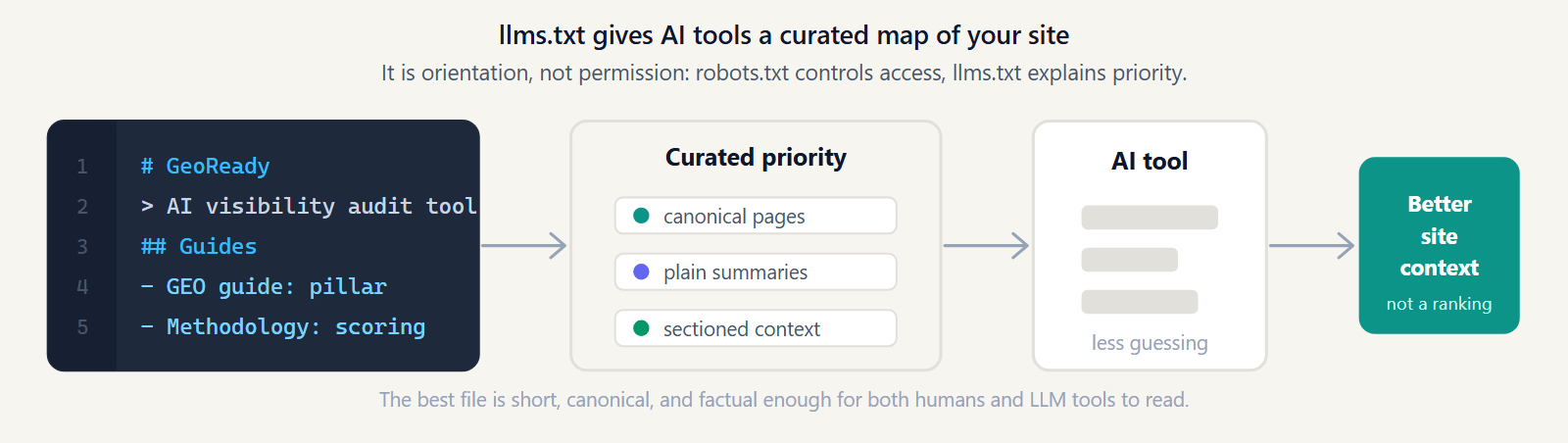
Learn what llms.txt is, how it differs from robots.txt, and how to use it to make your site easier for AI systems to understand.
Juan Camilo Auriti · June 10, 2026 · Updated September 24, 2026
llms.txt is a Markdown file, published at yourdomain.com/llms.txt, that gives AI systems a short, curated summary of what a site is about and which pages matter most.
It is not a ranking factor, not a required web standard, and not the same thing as robots.txt: it orients AI tools toward your canonical content, it does not grant or block crawler access, and no AI vendor has publicly confirmed that publishing one changes how often a site gets cited. Adoption is also uneven, not a one-way climb: in the July 2026 State of GEO edition — an audit of 360 live domains — llms.txt adoption fell from 58.3% to 54.2% month-over-month (−4.1 percentage points versus the June edition), even as overall schema-markup adoption rose 5.5 points over the same period.
Key facts
- Location — Domain root only — https://yourdomain.com/llms.txt (not a subfolder)
- Format — Plain Markdown: H1 title, optional > blockquote summary, H2 sections of linked pages — no XML, no validator
- Status — Community convention that emerged in 2024, not a spec from a formal standards body (unchanged as of September 2026)
- Relation to robots.txt / sitemap.xml — Complementary, not interchangeable — robots.txt grants/denies crawl access, sitemap.xml lists indexable URLs, llms.txt orients AI systems to what matters most
- Adoption — 360 domains audited in the July 2026 State of GEO edition; llms.txt adoption 54.2% (down from 58.3% in June, −4.1pp)
What is llms.txt?
llms.txt is a Markdown file you publish at https://yourdomain.com/llms.txt. Its job is to hand a large language model a clean, human-readable summary of your site: what the site is about, which pages matter, and where the canonical information lives. Instead of crawling and guessing, a model that reads the file gets a curated index written in plain language.
The format is deliberately simple. It starts with an H1 title, an optional blockquote summary, and then a set of H2 sections containing Markdown links to your important pages. There is no XML, no schema validator, no required tooling — just Markdown a person could read and an LLM can parse cheaply.
The proposal emerged in 2024 as a community convention, similar in spirit to how robots.txt and sitemap.xml became de facto standards. It is not part of an official HTTP specification and is not mandated by any AI vendor. Adoption is voluntary on both sides: you choose to publish it, and a given AI tool chooses whether to read it.
Why llms.txt matters for AI SEO
Large language models and AI answer engines work with limited context. When a tool needs to understand your site quickly, a curated file is far more efficient than crawling hundreds of pages full of navigation, cookie banners, and boilerplate. llms.txt lets you front-load the signal and strip out the noise.
For AI SEO, the value is about clarity and orientation rather than ranking:
- Disambiguation — you state, in your own words, what your site and brand are about, reducing the chance a model misclassifies you.
- Page prioritization — you point to the canonical version of important content instead of leaving a model to find it among duplicates and thin pages.
- Context efficiency — a short, structured file fits inside a model's context window, where a full crawl might not.
- Editorial control — you decide which pages represent you, in what order, with what framing.
Set expectations honestly. llms.txt is an orientation file, not a ranking factor. No AI vendor has confirmed that publishing it improves how often you are cited or recommended, and it cannot guarantee citations. The realistic benefit is that systems which do read it can understand you faster and more accurately — a foundation for visibility, not a lever that forces it. It complements broader generative engine optimization work; it does not replace it.
llms.txt vs robots.txt
The two files are often confused, but they do opposite jobs. robots.txt is about permission: it tells crawlers what they may and may not fetch. llms.txt is about orientation: it tells AI systems what your site means and where the important content is. It is also worth adding sitemap.xml to the comparison, since all three are root-level files that are easy to mix up — they solve different problems and are not interchangeable.
- Purpose — robots.txt: Grants or denies crawler access · llms.txt: Summarizes the site and points to canonical pages · sitemap.xml: Lists indexable URLs for discovery
- Format — robots.txt: User-agent / Disallow directives · llms.txt: Markdown headings and links · sitemap.xml: XML list of URLs
- Enforcement — robots.txt: Respected by well-behaved crawlers · llms.txt: Advisory only — grants no access by itself · sitemap.xml: Advisory — a discovery hint, not a directive
The bullets below expand on the most important contrast — permission versus orientation:
- Purpose — robots.txt grants or denies access; llms.txt summarizes and points to content.
- Format — robots.txt uses User-agent and Disallow directives; llms.txt uses Markdown headings and links.
- Audience — robots.txt speaks to crawlers like Googlebot and GPTBot; llms.txt speaks to LLM tools that read content directly.
- Enforcement — well-behaved crawlers respect robots.txt rules; llms.txt is purely advisory and grants no access by itself.
They are complementary, not interchangeable. If your robots.txt blocks an AI crawler such as GPTBot or PerplexityBot, publishing an llms.txt will not override that block — the crawler still cannot fetch the pages you reference. Get permission right in robots.txt first, then use llms.txt to guide the systems you have allowed in.
What to include in llms.txt
A good file is short, curated, and honest. Resist the urge to dump your whole sitemap into it — the point is to highlight what matters, not to mirror your navigation. Include the following:
- An H1 title — the name of your site or brand, so the model knows whose file this is.
- A blockquote summary — one or two sentences (a Markdown
>blockquote) describing what your site does and who it serves. - Sectioned links — H2 sections such as Docs, Guides, Product, or About, each containing Markdown links to canonical pages with a short note after each link.
- Canonical URLs only — link the authoritative version of each page, using the same trailing-slash convention as your site.
- An optional details section — secondary links you consider lower priority, often placed under a final section like Optional.
Keep descriptions factual. Each link should answer "what will a reader find here?" in plain language. Avoid marketing superlatives and avoid inventing claims — a model that reads inflated copy is more likely to misrepresent you, not less. Some sites also publish an optional companion file, llms-full.txt, with expanded page text for systems that ingest longer context, but the standard llms.txt is enough to start.
A simple llms.txt example
Here is a minimal, valid llms.txt. Note the structure: an H1 title, a blockquote summary, then H2 sections of annotated Markdown links.
# Acme Analytics

> Acme Analytics helps engineering teams track product usage without building a custom event pipeline. This file orients AI tools to our canonical docs and product pages.

## Docs
- [Quickstart](https://acme.example/docs/quickstart): Install the SDK and send your first event in under five minutes.
- [API reference](https://acme.example/docs/api): Full endpoint reference for the ingestion and query APIs.

## Product
- [Pricing](https://acme.example/pricing): Plans, limits, and what's included at each tier.
- [Changelog](https://acme.example/changelog): What shipped and when.

## Optional
- [Blog](https://acme.example/blog): Engineering posts and product updates — background reading, not required.
You can see a real file in production at geoready.dev/llms.txt — it uses the same title, blockquote, and sectioned-link structure described here. For a platform-specific walkthrough, see our llms.txt for WordPress guide, which covers both manual and plugin-based implementation.
llms.txt adoption in the wild
State of GEO is GeoReady's monthly benchmark of live, audited domains, and it is the only public dataset that tracks llms.txt adoption over time. Two consecutive editions show adoption isn't a one-way climb:
- June 2026 edition — 288 domains audited, average GEO score 53.6, 20.8% scoring "good or better."
- July 2026 edition — 360 domains audited, average GEO score 54.1, 24.7% scoring "good or better." Schema-markup adoption rose 5.5 percentage points month-over-month; llms.txt adoption fell from 58.3% to 54.2% (−4.1 percentage points) over the same period.
Read that drop carefully. It doesn't mean llms.txt is disappearing — the audited pool also grew by 72 domains between editions, and a percentage-point move can reflect mix shift as much as sites actively removing files. What it does show: llms.txt adoption is not a settled, monotonically rising metric, and treating it as a one-time checkbox is the wrong mental model. See the June and July editions of State of GEO for the full category breakdown.
Common mistakes
Most llms.txt problems come from treating it like a sitemap or a marketing page. Watch for these:
- Dumping every URL — a 400-link file defeats the purpose. Curate the pages that actually represent your site.
- Wrong location or content type — it must live at the domain root (/llms.txt) and be served as plain text, not HTML.
- Linking non-canonical or redirecting URLs — point to the final, canonical address with the correct trailing slash.
- Blocking the referenced pages in robots.txt — guiding a crawler to pages it is not allowed to fetch is self-defeating.
- Letting it go stale — if your important pages change, update the file. A snapshot from a year ago can point models at dead links.
- Treating it as a ranking lever — it is an orientation file. Expecting guaranteed citations or rankings from it leads to disappointment.
How to check whether your site has llms.txt
Checking is quick. You can do it three ways:
- Visit the URL directly — open https://yourdomain.com/llms.txt in a browser. If you see Markdown text, the file exists. A 404 means it is missing.
- Use the command line — run
curl -I https://yourdomain.com/llms.txtand confirm a 200 status and atext/plainortext/markdowncontent type. - Run an AI visibility audit — an automated check confirms the file exists, validates its structure (title, blockquote, sections, links), and flags issues alongside your other AI SEO signals. If the file is missing, malformed, or out of date, an audit will tell you exactly what to fix before you publish.
Don't have one yet? Use the free llms.txt generator to build a starter file from your sitemap in seconds.
Further reading
- Free llms.txt generator — build a starter llms.txt from your sitemap.
- Do you need llms.txt in 2026? — a decision framework if you're weighing whether it's worth the effort for your site.
- llms.txt for WordPress and AI visibility — manual and plugin-based implementation.
- GEO for Webflow: native llms.txt upload, robots.txt and JSON-LD on a Webflow site.
- Generative Engine Optimization — the broader practice llms.txt fits into.
- Our scoring methodology — how we weight llms.txt against the other AI visibility signals.
- GEO vs SEO — what changes when AI engines become the interface.
- AI SEO — how to make your site visible to AI answer engines.
- State of GEO — the adoption data cited above, updated monthly.
- The signals behind these guides: our research foundation.
- What Is WebMCP? The Next Layer of AI Discovery — apply this guide.
Find the technical blockers before adding more content.
Run the audit when the guide points to crawler access, structured data, llms.txt, or parsing issues that can stop AI systems from using the page.
Run the technical AI SEO audit · Check cited source coverage
- Best for crawlability, schema, robots.txt, and llms.txt work.
- Next metric: pass/fail technical signals before content rewriting.
Apply this guide
Find the technical blockers before adding more content.
Run the audit when the guide points to crawler access, structured data, llms.txt, or parsing issues that can stop AI systems from using the page.
- Best for crawlability, schema, robots.txt, and llms.txt work.
- Next metric: pass/fail technical signals before content rewriting.
Frequently asked questions
Is llms.txt a ranking factor?
No. No AI vendor has confirmed that llms.txt influences rankings or citation frequency, and it does not guarantee either. It is an orientation file that helps AI systems understand your site faster and more accurately. Treat it as a clarity signal, not a lever that forces visibility.
Where do I put the llms.txt file?
At the root of your domain, reachable at https://yourdomain.com/llms.txt, served as plain text. It belongs in the same location as robots.txt and sitemap.xml, not in a subfolder.
Is llms.txt the same as robots.txt?
No. robots.txt controls crawler access — what bots may fetch. llms.txt describes and indexes your content for AI systems. They are complementary: an llms.txt cannot override a block set in robots.txt.
Do AI systems actually read llms.txt?
Adoption is voluntary and varies by tool. Some LLM-powered tools and agents read it when they fetch a site; others do not. Because it is a community convention rather than a mandated standard, you should publish it as a low-effort best practice without expecting universal support.
What format does llms.txt use?
Plain Markdown: an H1 title, an optional > blockquote summary, and H2 sections containing Markdown links with short descriptions. There is no XML and no required validator — readability is the point.
How is llms.txt different from JSON-LD structured data?
JSON-LD structured data lives inside individual pages and describes entities and relationships for search engines and AI systems. llms.txt is a single site-level file that curates which pages matter. Use both: schema for per-page meaning, llms.txt for site-level orientation.
Get the monthly State of GEO report
AI search readiness benchmarks, adoption stats, and the actions that move the needle — delivered monthly. No spam.
By submitting, you agree to receive the monthly GeoReady newsletter: benchmark data from the State of GEO dataset, practical GEO guidance, and product updates. You can unsubscribe anytime. See our Privacy Policy.