Turn a sitemap into an AI-readable orientation file.
This free tool reads your sitemap and generates an llms.txt file — a clean, editable Markdown index of your most important pages. An llms.txt is a guidance file that helps AI systems understand your site; it is not a confirmed ranking factor and does not guarantee citations. Generate it, edit it, and publish it at your domain root.
Input
Homepage or sitemap URL.
Transform
Grouped Markdown sections.
Publish
/llms.txt at the domain root.
# Example Co> AI visibility tools and guides for modern teams. ## Pages- [Home](https://example.com/)- [Pricing](https://example.com/pricing/) ## Guides- [What is llms.txt](https://example.com/guides/llms-txt/)- [AI SEO basics](https://example.com/guides/ai-seo/)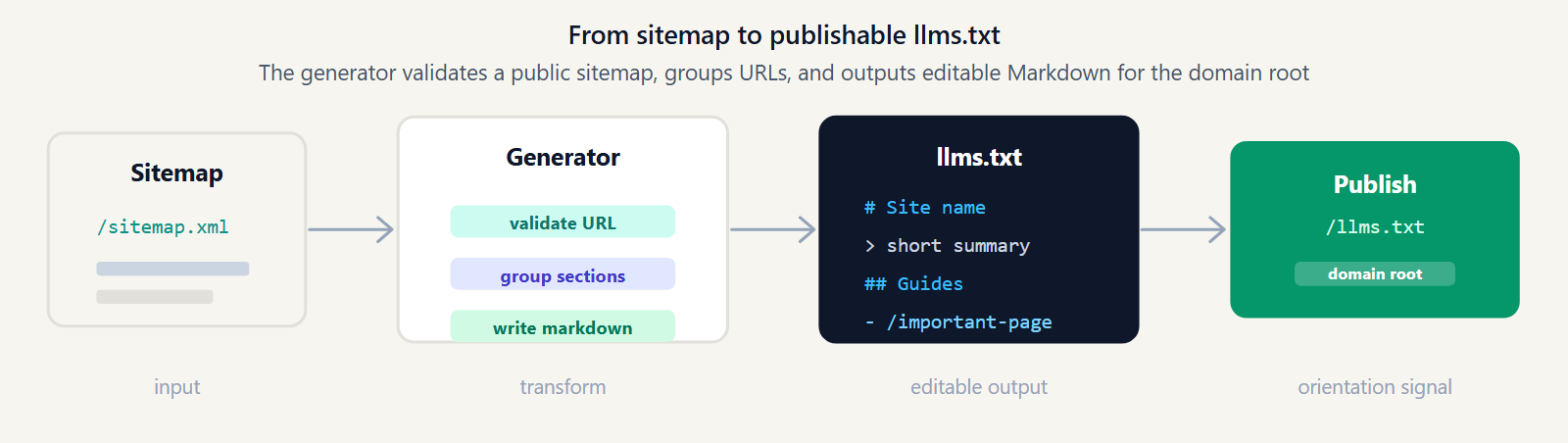
Generate your llms.txt
Start from a URL, then edit the Markdown before publishing it.
Tool workspace
POST /api/llms/generate
What is an llms.txt generator?
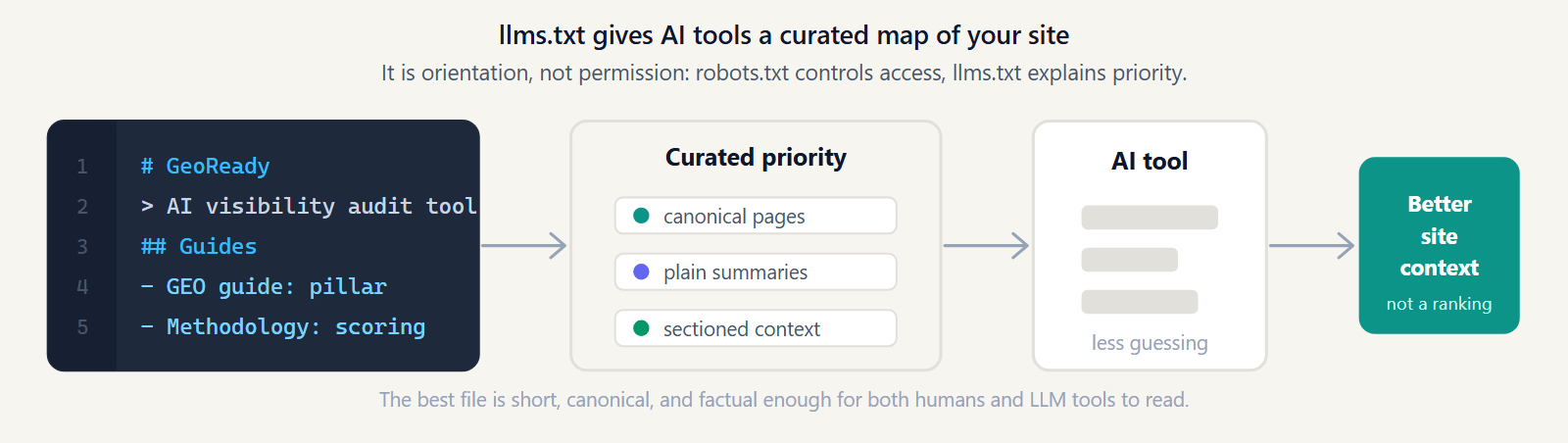
An llms.txt generator is a tool that builds an llms.txt file for your site automatically. The file is a plain-text Markdown document that lists your most important pages with short descriptions, so AI systems and LLM-powered tools can orient themselves around what your site is about and which URLs matter.
Instead of writing the file by hand, this generator reads your sitemap, groups the URLs into sections, and produces a ready-to-edit Markdown file. It is an orientation file, not a ranking mechanism: no AI vendor has confirmed that publishing llms.txt forces citations or improves rankings. Think of it as a way to make your site easier to understand, not a guarantee of visibility. Read more in our guide to what llms.txt is.
How this generator works
The process is straightforward and runs in a few seconds:
- Reads your sitemap — it discovers your sitemap automatically from your domain, or uses the sitemap URL you provide.
- Categorizes your URLs — pages are grouped into sections based on their structure, so the file is organized rather than a flat dump of links.
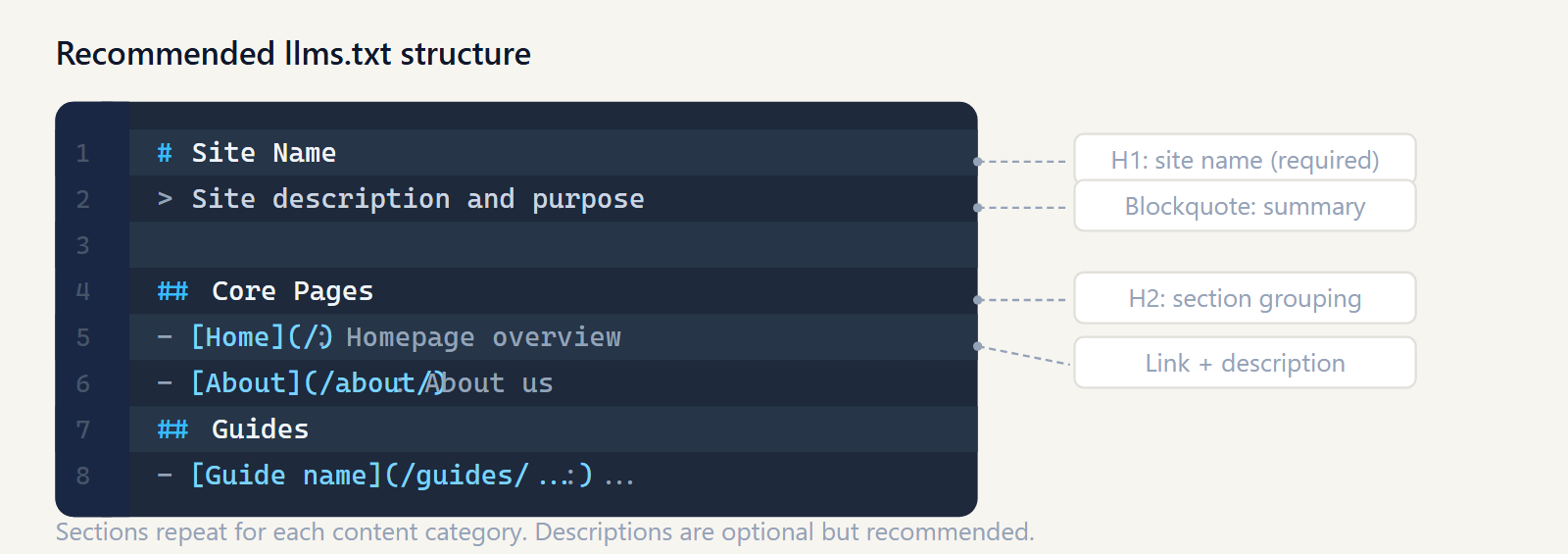
- Generates clean Markdown — the output is a standard llms.txt with an H1 title, an optional summary, and H2 sections of links, ready to copy or download.
Every URL is validated before it is fetched, with anti-SSRF protection and size limits, so the tool only talks to safe, public endpoints. For speed, page titles are not fetched individually — the generator uses the URL structure from your sitemap. That keeps generation fast, and you can refine titles and descriptions yourself in the editable output.
What to do after generating llms.txt
The generated file is a starting point. To put it to work:
- Save it as /llms.txt in your site root. Upload the file so it is reachable at
https://yourdomain.com/llms.txt, served as plain text — the same place as your robots.txt and sitemap. - Edit it for clarity. Rewrite the title and summary in your own words, sharpen link descriptions, remove pages that do not matter, and move your most important content to the top. In theSeptember 2026 State of GEO, 54.7% of detected llms.txt files were thin stubs.
- Verify it loads. Open the URL in a browser to confirm the file is served correctly and is not blocked by your robots.txt or a redirect.
On WordPress, hosting a static /llms.txt takes a couple of extra steps — see the guide to adding llms.txt to WordPress. For a direct WordPress workflow, use the llms.txt generator for WordPress. When you want the full picture beyond llms.txt — crawlability, schema, content signals, and AI discovery — run a free AI visibility audit.
What llms.txt covers and what it does not cover
Publishing llms.txt improves orientation, but it does not replace a full GEO workflow. Use this table to decide the next check after the file is live.
| Need | Covered by llms.txt? | Next GeoReady step |
|---|---|---|
| List important URLs | Yes. llms.txt can summarize canonical pages and sections. | Generate the file, edit descriptions, publish at /llms.txt. |
| Allow AI crawler access | No. robots.txt and server rules still control access. | Run the free audit to check robots.txt, redirects, and blocked agents. |
| Earn AI citations | No. Citations depend on source quality, structure, and off-page signals. | Track citation prompts and competitor sources over time. |
| Catch regressions | No. A static file will not tell you when visibility drops. | Monitor weekly changes with GeoReady Pro. |
llms.txt generator FAQ
What is llms.txt?
llms.txt is a plain-text Markdown file you publish at your domain root that lists your most important pages with short descriptions, so AI systems can orient themselves around what your site is about. It sits alongside robots.txt and sitemap.xml and acts as a clarity signal, not a ranking lever.
What does this llms.txt generator do?
It reads your sitemap, groups the URLs into H2 sections, and produces a ready-to-edit llms.txt with an H1 title and an optional summary. Instead of writing the file by hand, you get a structured starting point you can refine and publish.
What input does the generator need?
A sitemap. Paste your sitemap URL, or enter your homepage URL and the generator discovers the sitemap automatically. If no sitemap is found, it falls back to a minimal file built from your homepage.
Is llms.txt a ranking factor?
No. No major AI engine has confirmed that llms.txt changes how a site is ranked or cited, and it does not guarantee citations. It is an orientation file that helps AI systems understand your site faster — treat it as a clarity signal, not a lever that forces visibility.
Where should I upload llms.txt?
At the root of your domain, reachable at https://yourdomain.com/llms.txt and served as plain text. It belongs in the same location as robots.txt and sitemap.xml, not inside a subfolder.
Does this replace robots.txt?
No. robots.txt controls crawler access — what bots may fetch. llms.txt describes and indexes your content for AI systems. They are complementary: an llms.txt cannot override a block you set in robots.txt.
Can I edit the generated file?
Yes. The generated file is a starting point built from your sitemap. Edit the title, summary, and link descriptions, remove pages that do not matter, and reorder sections so your most important content comes first.
Why was no sitemap found?
A sitemap may be absent, served at a non-standard path, or blocked from automated fetching. When that happens the generator falls back to a minimal file from your homepage. You can paste a sitemap URL manually to get a complete result.
Go beyond llms.txt with a full AI SEO audit
An llms.txt is one signal. The free audit checks your site across eight GEO categories — crawlability, llms.txt, schema, content signals, AI discovery, and more — so you know where to focus next. No account needed.
New to the standard? Start with what is llms.txt.